 Startwerk
Type and tick off
A line at the bottom, Enter, done — the field stays open for the next one. Tick off with one click, rewrite with the pencil, drag to reorder.
The to-do list puts your tasks on Chrome's new tab — a task manager you never have to open. Type and press Enter, tick off with one click. A date, a priority or a tag go into the same line, and one click opens the big window with lists, search and a board. Free, no account, everything stays in your browser.
Startwerk is a Chrome extension for the desktop. Mail yourself the link so it is there when you are back at your computer.
Email me the linkFree Chrome extension · No account · No tracking
Task lists rarely fail for lack of features. They fail because you have to open them. The app is in another window, the note is under the keyboard, and what you cannot see, you do not do.
The new tab, on the other hand, you see all day, dozens of times. With the list there, nothing has to be opened and nothing looked up — you drop something in as you pass and tick it off next time around. No account, no sign-up, nothing synced with us.
And since a browser is a browser, half of what you mean to do comes from the web anyway: an article you wanted to read, a form still to fill in. One click on the Startwerk icon in the toolbar saves the open page as a task, with its title and favicon. Later, one click on the entry takes you back.
That makes Startwerk a to-do list app without a separate app: a free task manager and day planner in one, with due dates, priorities, tags, repeats and a board for when the list grows.
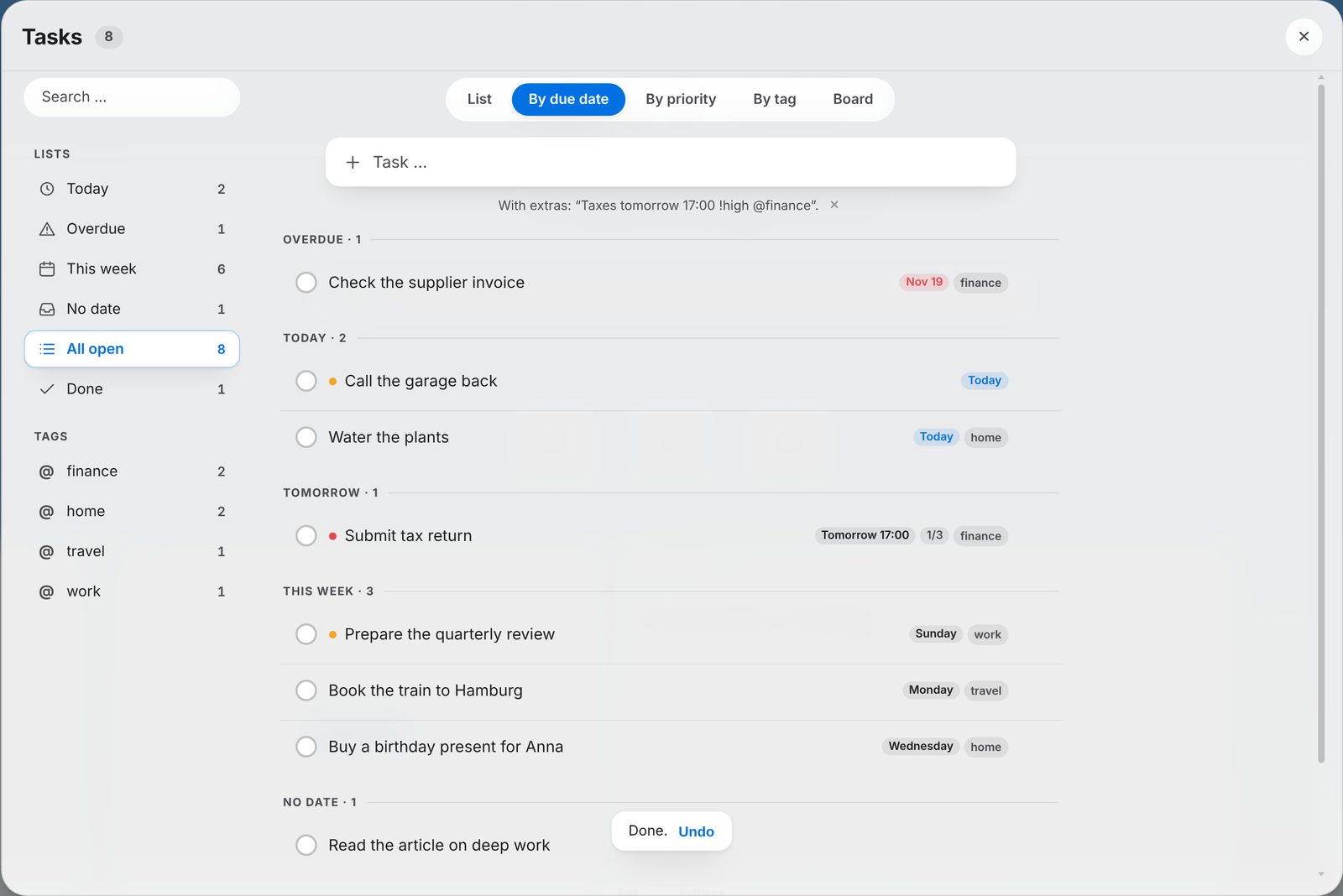
The card on the start page stays your list for the day. Everything else is in the big window: smart lists and tags on the left, grouping and the board at the top. A click on a task opens its details — link, due date, repeat, priority, tags and steps.
A line at the bottom, Enter, done — the field stays open for the next one. Tick off with one click, rewrite with the pencil, drag to reorder.
“Taxes tomorrow 17:00 !high @finance” becomes a task due tomorrow at five, marked high and tagged finance. Weekdays, dates and “today” work in every language Startwerk speaks; whatever is not clear stays in the text.
The arrow in the card header opens all your tasks: lists for today, overdue, this week and no date, your tags, a search, grouping by due date, priority or tag, and a board to drag tasks across. Esc closes it.
Daily, weekly, monthly or seven days after you finish: tick off a repeating task and the next one is already waiting. Bigger tasks get steps of their own, and the row shows how many are done.
The Startwerk icon in the toolbar shows how many tasks are due today or overdue, across all cards. You see it on every tab, not just the new one.
One click on the toolbar icon (or Alt+Shift+T) turns the open page into a task. The entry links back to the page. No extra permission is needed for it.
You can place the widget more than once and limit each card to certain Spaces: work in the work Space, the shopping at home. Up to 200 open tasks per card.
In the habit tracker, link a habit to the to-do list — three finished tasks a day, say. The tick lands on the third.
Add Startwerk to Chrome and open a new tab. The page is there right away.
Click Edit, then “+ Widget”. You will find “To-do list” under “Time & planning”.
A fresh card shows three lines explaining the essentials. They disappear with your first task.
Free. Private. Set up in three minutes.