 Startwerk
Up to eight cities
Search any town in the world with 15,000 inhabitants or more. The search runs offline and knows many names per city: Munich and München both work.
What time is it in New York right now, and is anyone still at their desk? Startwerk’s world clock answers before you have to search: up to eight cities on your new tab, each with its time, the difference to yours and a band that shows its business hours. One slider works as a time zone converter and moves every clock at once. Free, no account, nothing to set up beyond picking your cities.
Startwerk is a Chrome extension for the desktop. Mail yourself the link so it is there when you are back at your computer.
Email me the linkFree Chrome extension · No account · No tracking
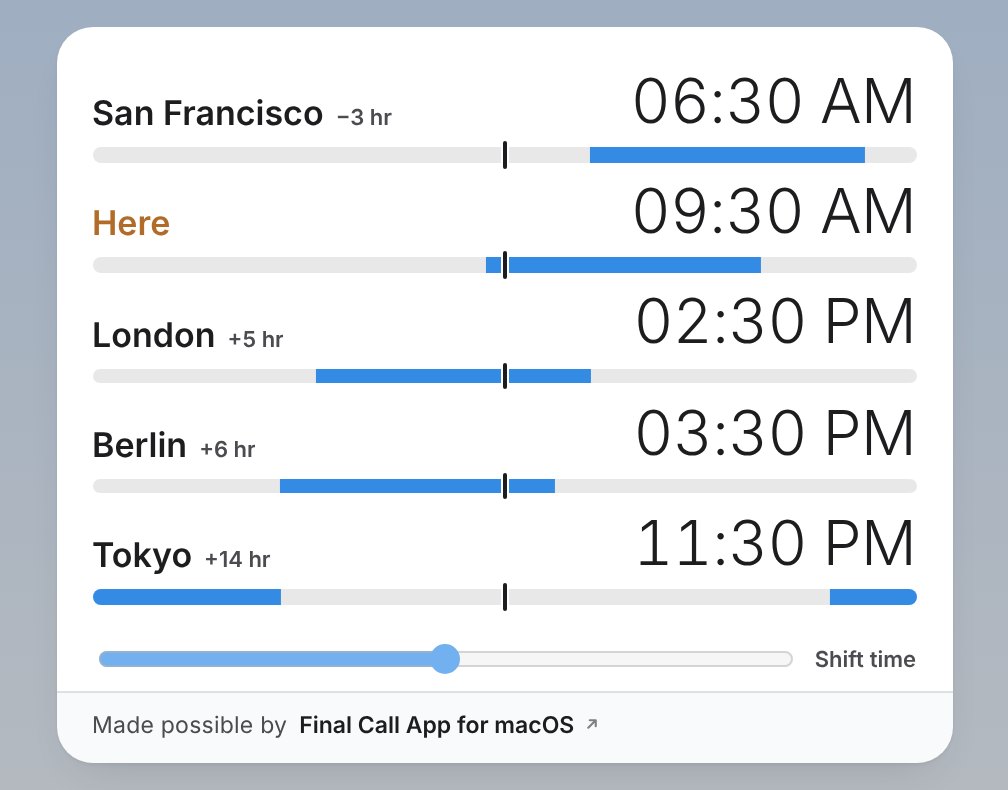
Live in your browser, sorted from west to east. Drag the slider to compare times across time zones. In Startwerk you pick your own cities.
If you work with people in other countries, you look up the time difference again and again: is it too late to call Singapore, has New York started yet, is Sydney already in tomorrow? Each time it means a search, a tab, a quick sum in your head.
The world clock keeps those answers where you look dozens of times a day anyway. It sorts the cities from west to east and puts your own time in between, so you see at a glance who is ahead and who is behind. Daylight saving time is handled by your browser, for every country.
Search any town in the world with 15,000 inhabitants or more. The search runs offline and knows many names per city: Munich and München both work.
“Here” sits among the cities, in west-to-east order, so it is always clear which cities are ahead of you.
Under every city runs a band across 24 hours. Business hours from 9 to 5 are coloured, and the line in the middle marks the current time — in the same spot in every row. Where the line sits on colour, people are at work.
Drag the slider up to twelve hours forward or back and every clock moves along. “Now” brings them back to the real time.
Your browser knows the rules of every time zone. When the clocks change in New York or Sydney, the widget changes with them.
The clock runs entirely in your browser. Nothing is downloaded while you use it, and it needs no extra permission.
Add Startwerk to Chrome and open a new tab.
In Startwerk, click Edit, then + Widget, and choose World clock from “Time & planning”.
Three cities are suggested. Remove the ones you don’t need and type the name of any city to add it.
Free. Private. Set up in three minutes.